Law Firm SEO
Measurement & Analytics for Law Firm SEO (Part Six)
Updated: 07/13/2026

by Andrew Nasrinpay
Partner



Table of Contents
SEO doesn’t work on autopilot. You need data, but not too much data. The firms that succeed know exactly what to measure, how often to measure it, and when to act on what they find. Analytics is how you figure out what’s worth your time and what’s not.
What to Track and Why
SEO only works when you can measure what matters. Law firms often focus only on certain numbers — total traffic, keyword count, or page-one rankings — when those metrics don’t always translate into consultations or signed clients.
The goal of measurement is simple: connect your marketing activity to real business outcomes. That means identifying which data points actually tell you if your visibility efforts are producing leads that convert into cases.
Beyond Vanity Metrics
Vanity metrics are the numbers that look impressive but don’t drive revenue. A spike in traffic, for example, might feel like progress, but if none of that traffic fills out a form or picks up the phone, it’s just noise.
Instead of tracking every possible data point, zero in on the ones that align with how your firm grows: leads, consultations, signed cases, and — when possible — revenue per case. These are the metrics that connect SEO to ROI.
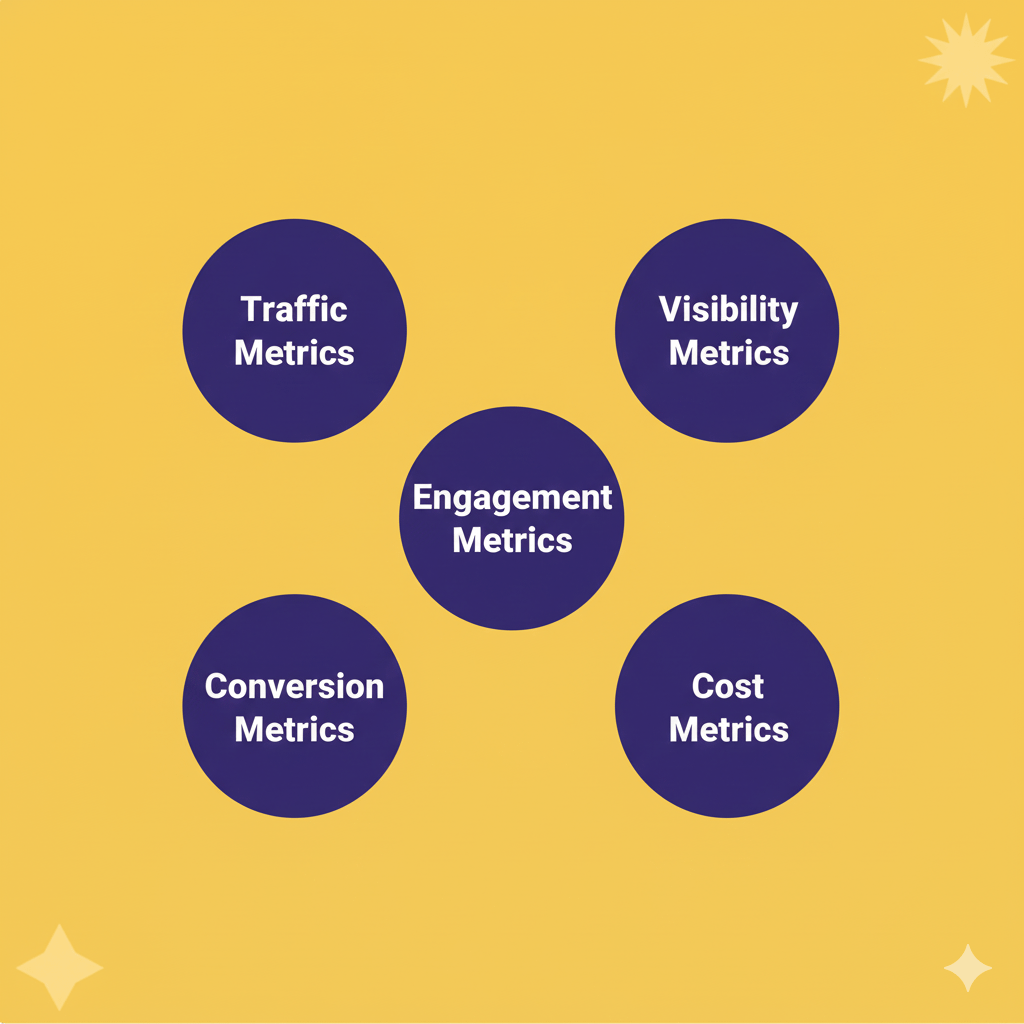
For most law firms, there are three categories worth tracking consistently:
- Visibility: Are people finding you? Includes impressions, search rankings, and Map Pack placement.
- Engagement: Are visitors interacting? Includes clicks, time on page, call button taps, and form completions.
- Conversion: Are inquiries turning into clients? Includes calls booked, consultations held, and cases signed.
These tiers form the backbone of a measurement system that’s both simple and effective. If a number doesn’t fall into one of these categories, it’s probably a secondary metric — nice to know, but not essential to decision-making.
Why Traffic Spikes Happen
Short-term jumps in traffic usually come from news-related searches, non-local visitors, or recent site updates that trigger extra Google crawling. Those spikes rarely last — or lead to new clients — unless engagement rises with them.

Aligning Metrics with Business Goals
Every firm has its own definition of success. A personal injury firm might measure cases signed per month; a family law firm might focus on consultations booked; an employment firm might look at qualified form submissions.
Start by identifying which types of leads actually turn into paying clients, then work backward. If 40% of your web form inquiries never schedule consultations, focus on improving conversion rate before chasing more traffic.
The purpose of tracking is clarity, right? You’re not building dashboards for the sake of data; you’re trying to see where your marketing produces the best return and where it doesn’t.
Tracking Frequency and Cadence
Consistency matters more than volume. Reviewing data weekly leads to reactionary changes, while annual reviews come too late to fix anything. The sweet spot for most firms is:

- Weekly: Quick check on calls, leads, and GBP engagement.
- Monthly: Full performance review with traffic, leads, and conversion data.
- Quarterly: Strategic analysis and adjustments to campaigns, content, or spend.
When your cadence is predictable, your insights become meaningful because you can spot the patterns.
Tools for Law Firm SEO Analytics
Data only helps if you can trust it — and if you actually look at it. Most law firms already have access to powerful analytics tools; they just need a consistent way to connect them and interpret what they’re saying.
We don’t expect you to become SEO data analysts; that’s literally our job. And we don’t even expect you to learn how to use all of these tools. But we think understanding how some of these tools work can benefit you. Plus, when we say “Oh, we need Analytics access” or “we recommend a dynamic tracking number,” you’ll know why.
Google Analytics 4 (GA4)
Let’s start with the big dog. GA4 is the backbone of most SEO reporting. It tracks how visitors find and interact with your website: which pages they land on, how long they stay, and what actions they take before leaving.
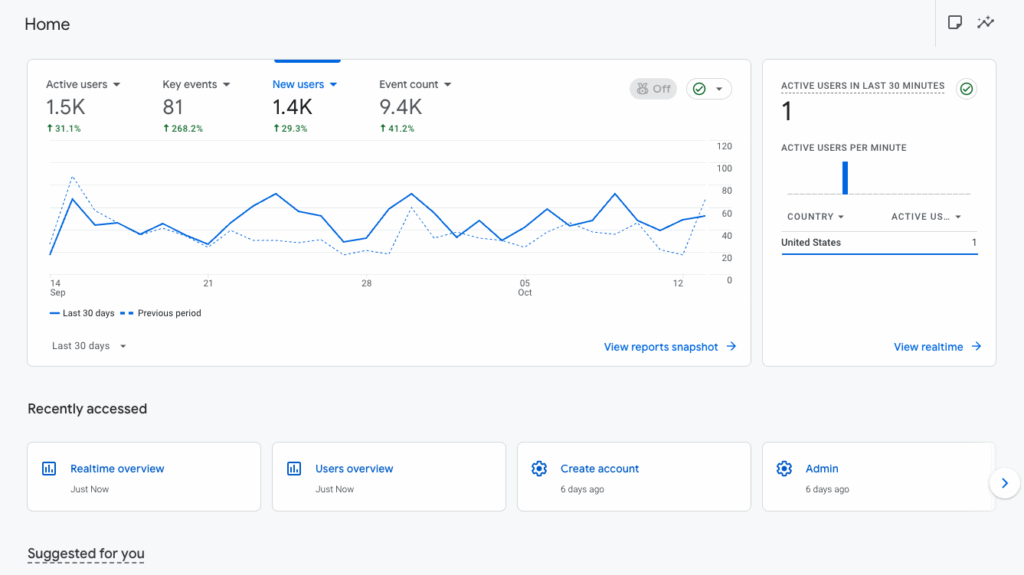
Key features to focus on:
- Traffic acquisition: Shows where visitors come from (organic search, paid ads, social, referrals).
- Engagement rate: Replaces “bounce rate” to reflect meaningful interaction.
- Events and conversions: Tracks when someone completes a desired action, like filling out a form or calling your office.
- User journeys: Helps you see how people move through the site before contacting you.
If you’re new to GA4, it can feel like a LOT all at once. The best approach is to customize it: create a few dashboards or saved reports that show only what matters most. As you get used to it, you can utilize more features.
Google Search Console (GSC)
This is the… other big dog, we guess. While GA4 tells you what happens on your site, Search Console shows how people find it.
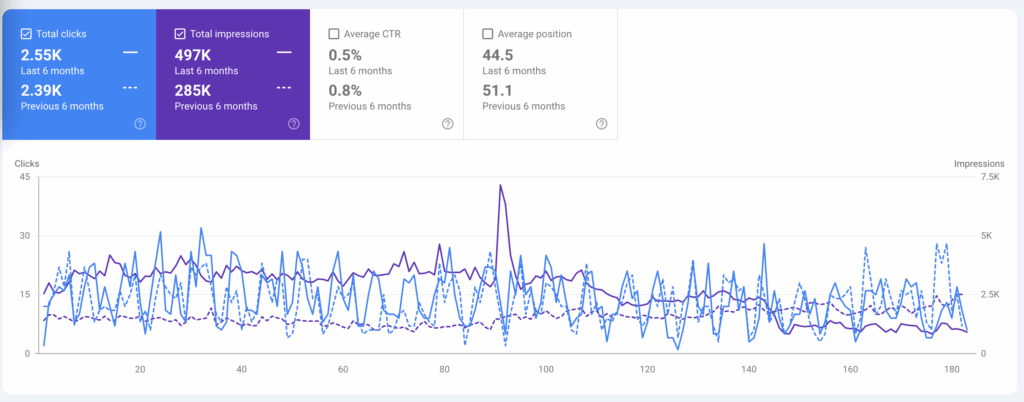
GSC reports the search queries, impressions, and click-through rates (CTR) that drive your organic traffic. It also alerts you to indexing issues or technical errors that might be holding pages back.
Law firms should keep their eyes on:
- Top-performing queries: The keywords or phrases that bring in the most clicks.
- Pages with high impressions but low CTR: These might need stronger titles or meta descriptions.
- Mobile usability reports: Clients searching for attorneys are often on their phones.
- Coverage errors: Make sure key practice pages are indexed properly.
Together, GA4 and GSC give you the “what” and “why” behind your visibility.
Additional SEO Tools Worth Knowing
Some firms need deeper visibility into rankings, content quality, backlinks, or technical performance. These tools extend your analytics stack without replacing the core platforms you already use.
Technical and Crawling Tools: Screaming Frog
A desktop crawler that scans your entire website the way a search engine would. It surfaces broken links, redirect chains, duplicate content, missing meta tags, thin pages, and indexing issues. It’s especially helpful during site migrations, audits, or when traffic drops and you need to diagnose why.
Keyword Research Tools
- Google Keyword Planner: Provides reliable search-volume ranges and keyword ideas straight from Google. Even though it was built for ads, it remains one of the most accurate free sources of demand data.
- SEMrush: Strong for competitive keyword research. Gives you keyword difficulty scores, SERP features, topic clusters, and insight into what competitors are ranking for.
- Ahrefs: Similar to SEMrush but with a larger backlink index. Useful for mining long-tail queries, finding related terms, and analyzing how difficult it will be to rank in a specific area of law.
Ahrefs is also the industry standard for backlink auditing. It shows you who links to your site, which links you’ve lost, and what kind of authority your backlink profile carries compared to competing firms. This is critical for assessing off-page strength.
SEO Content Optimization
- Clearscope: Analyzes top-ranking pages and provides a content “grade” based on topical coverage. Useful for ensuring long-form guides or practice pages answer the questions Google expects.
- Surfer SEO: Offers similar optimization guidance with stronger tooling for SERP analysis and content briefs. Helpful when producing or refreshing high-competition pages.
- Yoast SEO (WordPress): Handles on-page basics like title tags, meta descriptions, schema, readability analysis, and internal linking prompts. Not a ranking tool — more of a guardrail so pages are technically clean.
Rank Tracking
AccuRanker: A precise, enterprise-grade rank-tracker that updates daily. Ideal for firms that monitor hundreds of keywords across multiple markets.
SE Ranking: A more budget-friendly tracker with reliable daily updates, competitor data, and on-page audit tools. Good for firms with a smaller keyword footprint.
Local Rank Tracking: Local Falcon
Local Falcon shows how your Google Business Profile ranks across a geographic grid — not just one ZIP code. This helps visualize “map pack radius,” local competition, and how proximity affects visibility. It’s a must-have tool for multi-office firms and competitive metros.
AI Search and Your Data
Google’s new AI-powered results change how some metrics behave in Search Console. Impressions may drop when your pages are referenced in AI summaries without links, and click-through rates often dip as users get answers directly in search. Watch trends over time, not single spikes, and pair Search Console data with GBP and Analytics to see the full picture.
Google Business Profile (GBP) Insights
GBP Insights focuses on your local presence — how often your listing appears in Maps, what actions people take, and how many calls or requests for directions come through. You click on the “performance” button in your listing to access it.
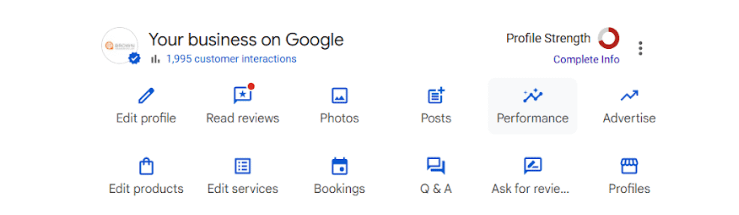
The most important metrics include:
- Searches: How people found your profile (by name, category, or keyword).
- Actions: Calls, website visits, messages, and direction requests.
- Photo views: A quick way to gauge engagement; new photos often drive more activity.
- Post performance: Which updates or offers generate the most clicks.
Review GBP Insights monthly. Spikes in calls or direction requests often signal that your listing updates, reviews, or photos are making an impact.
Call Tracking and Form Tracking
Tracking conversions means tracking leads, not just page views.
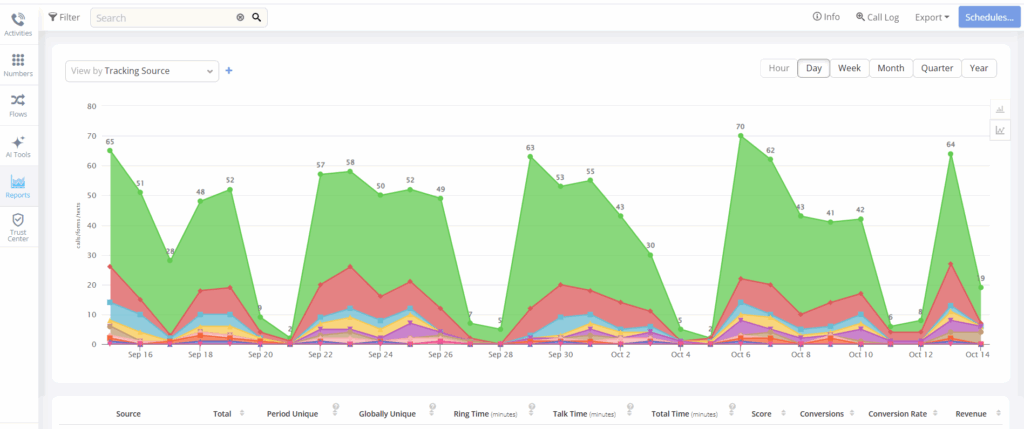
For calls, dynamic number insertion (DNI) software like CallRail or CallTracking Metrics will assign tracking numbers to campaigns or traffic sources. Just be sure to list your permanent local number as your “primary” contact everywhere else, so your NAP consistency stays intact.


For forms and chat:
-
Connect your contact forms to GA4 through conversion events.
-
Track chats through your live chat provider’s built-in analytics.
-
Make sure all leads flow into one CRM or intake dashboard for unified reporting.
These integrations let you measure in real time what kind of impact your campaigns are having. They can also tell you where you need to invest more time or resources, and where you’re getting the most bang for your buck.
CRM and Intake Systems
Your CRM connects the marketing data you track with the cases you actually sign. It should show you where each lead originated, who handled intake, and what the outcome was. Over time, that data helps you see patterns: which channels bring qualified clients, which waste time, and how quickly leads move from first contact to consultation.
When your CRM data matches what you see in Analytics and GBP Insights, you can confidently evaluate which efforts generate meaningful growth instead of just activity. We have created a definitive guide on law firm CRMs if you aren’t sure which CRM is best for your firm’s needs.
Dashboards and Automation
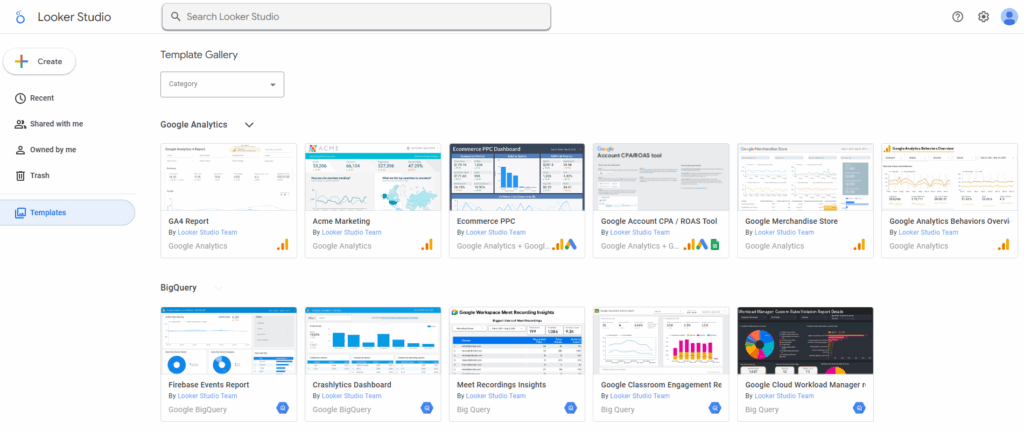
No one wants to dig through a dozen platforms every month. Instead, you can set up a simple dashboard that consolidates the essentials.
Use Looker Studio (formerly Data Studio) or your CRM’s built-in reporting to display:
-
Leads by source (organic, local, paid, referral)
-
Monthly call volume and conversion rate
-
Top-performing pages or posts
-
Year-over-year trends
Keep it clean and visual. A two-page dashboard beats a 50-slide report every time. (Believe us – we know).
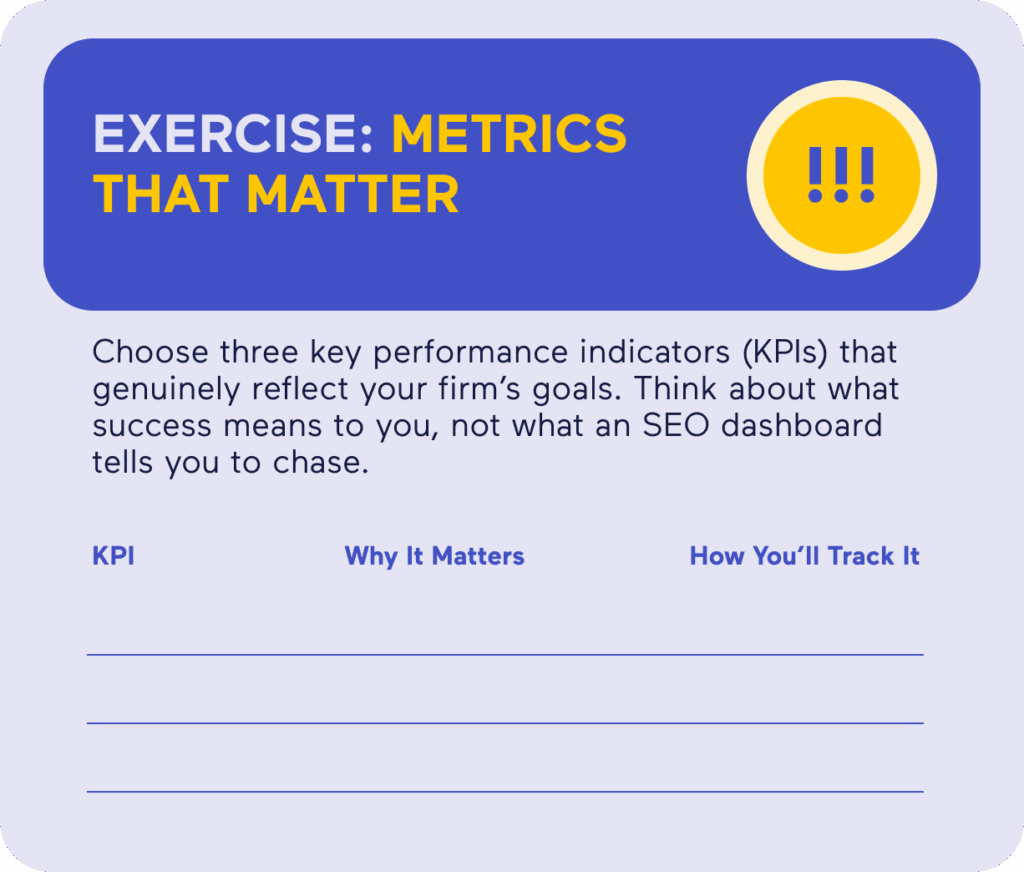
Exercise:
Your Analytics Stack

Understanding Key SEO Metrics
Now that you have the tools, you need to understand what the numbers mean and how to read them in context. These are the metrics that tell you whether your marketing is doing its job.
Traffic Metrics
The goal isn’t to drive traffic to the site for the sake of traffic; it’s to get people to call you. Look at sessions, users, and page views, but focus on trends over time, not daily spikes.
-
If your traffic is growing and conversion rates are steady, you’re on the right path.
-
If traffic grows but leads drop, you might be attracting the wrong audience.
Visibility Metrics
These tell you how often you’re showing up when potential clients search.
- Impressions: The number of times your pages appeared in search.
- Average position: Where you rank, on average, for target queries.
- Click-through rate (CTR): The percentage of people who see your listing and click.
Low CTR usually means your titles or descriptions don’t connect with intent. Rewrite them like headlines: clear, relevant, and human.
Engagement Metrics
Engagement measures what visitors do once they find you.
- Average engagement time in GA4 replaces the old “bounce rate.”
- Scroll depth shows whether people are reading or skimming.
- Call button clicks, form completions, and chat initiations show real intent.
If visitors are bouncing fast, your page might be ranking for the wrong term — or the content just isn’t answering the question well enough. Either way, you probably want to add that page (or those pages) to your content update list.
Conversion Metrics
Conversion metrics tell you if your marketing is doing more than just generating clicks.
You can track conversions across every entry point:
-
Form fills
-
Phone calls
-
Chat messages
-
Booked consultations
Each of these represents intent, but obviously they’re all weighted differently. A ten-second call that ends in a hang-up isn’t the same as a 20-minute intake conversation.
The most useful data goes one step further: linking conversions to outcomes. Use your CRM or intake software to trace which leads actually became signed clients. Over time, you’ll see which channels deliver volume and which deliver value.
For the record, if most of your signed cases come from organic search but most of your calls come from ads, that’s not a contradiction — it’s a clue. It means your ads create awareness, but your SEO builds trust. Both matter; you just measure them differently.
The key to understanding what’s working is consistency. Log every lead source, connect it to your CRM, and review outcomes monthly. That’s how you move from “We’re getting more leads” to “We’re signing better clients.”
Cost Metrics
Tracking cost per lead (CPL) and cost per signed case (CPC) helps balance your marketing budget. A cheap lead that never converts isn’t actually cheap; it’s wasted money. Track both cost and quality so you can shift budget toward what delivers actual cases.
Attribution Models and Lead Sources
In legal marketing, it’s easy to give all the credit to the last click. A user searches “car accident lawyer,” clicks your site, and calls — case closed, right?
Not really.
That click was probably the final step in a looooong chain: an ad they saw two weeks ago, a blog they read last month, a friend’s recommendation, or a previous visit through your Google Business Profile. Attribution tells you which channels actually influence hiring decisions. SEO is often a touchpoint within the consumer journey for many clients.
The Common Models
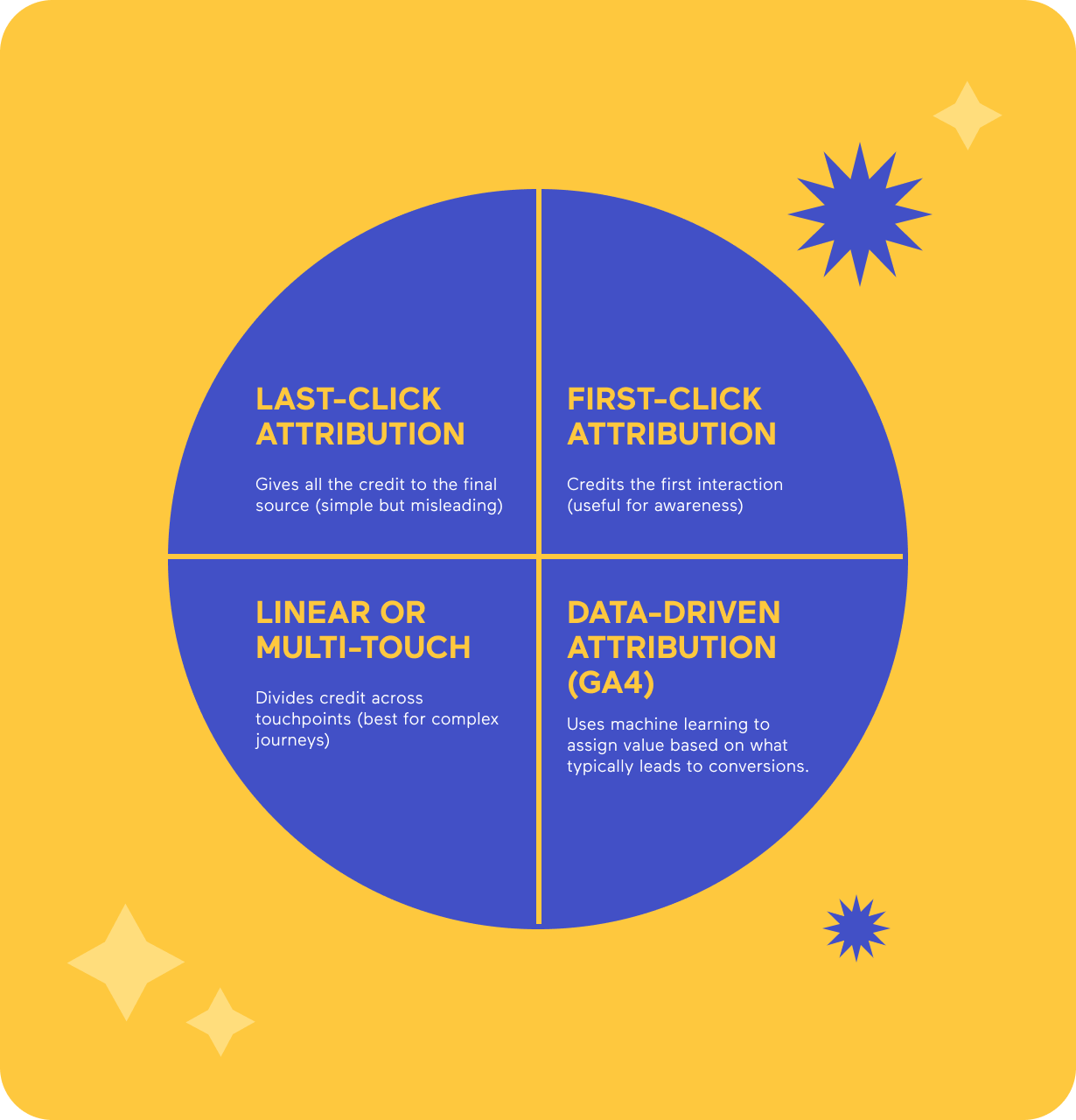
No single model is perfect. What matters is picking one and sticking with it, so your data tells a consistent story over time.
Connecting the Dots
Analytics means nothing in isolation. The real insight comes from comparing where your leads start and how they finish. Look for patterns between sources and outcomes:
- ➢ Do clients who find you through organic search tend to sign faster or stay longer?
- ➢ Are referral leads higher quality, even if there are fewer of them?
- ➢ Do GBP calls close at a higher rate than web form submissions?
- ➢ Do paid leads convert more often when they’ve previously engaged with your content or email list?
- ➢ Are certain practice areas producing most of your repeat or referral clients?
- ➢ Does response time from your intake team change the likelihood of a signed case?
- ➢ Do clients who interact through chat or text end up retaining you faster than those who call?
Those patterns reveal how different channels work together. For example, maybe a client first discovers your firm through a blog, follows you on social media, and finally calls after reading reviews on your Google Business Profile. That’s not three leads; it’s one informed decision shaped by multiple touchpoints.
When you start seeing data this way, your reports stop being “traffic snapshots” and become maps of real client behavior. You’ll know where to double down and where to scale back.
Reporting and Interpreting Data
Analytics only matter when they help you make better decisions. Reporting isn’t about creating more spreadsheets or dashboards; it’s about understanding what’s working, what isn’t, and what to do next. The goal is to give yourself clarity, not busywork.
Monthly Reporting
A monthly report is a quick check-in on how your marketing is performing. You don’t need pages of charts or week-by-week graphs. Focus instead on a few core questions:
-
Are you reaching more of the right people?
-
Are those people engaging with your content in a meaningful way?
-
Are you seeing consistent inquiries from qualified leads?
At this stage, you’re looking for small but steady movement in the right direction. If your impressions are up but inquiries are flat, something’s missing in your messaging or calls to action. If inquiries are rising but cases aren’t, it may be time to review intake or follow-up processes. A good monthly report helps you connect those dots without drowning in data.
Quarterly Analysis
Quarterly reviews take a wider lens. Unlike a monthly report, which can help you make quick adjustments, quarterly reporting helps you evaluate patterns and understand why those patterns exist.
- Every three months, compare your metrics against firm goals: are you on track to meet the targets you set earlier in the year? Are you signing the right kinds of cases, or just more cases in general?
- This is also the right time to ask strategic questions:. Are there practice areas that consistently outperform others in visibility or conversions? Are there campaigns that haven’t justified their costs? Does your content still reflect your firm’s most profitable work?
Quarterly analysis helps you see cause and effect. It’s not just about whether the numbers are going up or down; it’s about what those movements tell you about client behavior, your competitive landscape, and your team’s execution.
Dashboards That Work in Practice
A good dashboard will make your life so much easier – we promise. Ideally, you want one dashboard that automatically updates and displays the essentials:
- Traffic and visibility: which pages are attracting potential clients and from where.
- Lead generation: how many people are calling, filling out forms, or booking consultations.
- Local performance: GBP activity, direction requests, and review trends.
- Return on investment: your cost per lead and cost per signed case.
That’s enough to see where your marketing stands and to make reasonable decisions about what to adjust. The goal isn’t to be exhaustive; it’s to make sure no one has to dig through multiple logins to get a sense of how things are going.
A good dashboard should tell you, within a minute, whether performance is trending up, down, or holding steady. If it doesn’t, it’s too complicated.
Exercise:
Your SEO Scorecard

our authors



Sources and References
- CallTrackingMetrics. (n.d.). CallTrackingMetrics. https://www.calltrackingmetrics.com/
- Google. (n.d.). Google Analytics. https://marketingplatform.google.com/about/analytics/
- Google. (n.d.). Google Search Console. https://search.google.com/search-console/about
Glossary

Algorithm – The set of rules search engines use to decide which pages show up (and in what order) when someone searches for something. Google tweaks it constantly just to keep everyone guessing.
Alt Text – A written description of an image that helps search engines and screen readers understand what’s shown. Also handy for accessibility compliance.
Anchor Text – The visible, clickable text of a hyperlink that indicates the topic or destination of the linked page.
Backlink – A link from one website to another. The digital equivalent of a vote of confidence — except sometimes people buy votes, and Google frowns on that.
Bounce Rate – The percentage of visitors who leave your site after viewing just one page. High isn’t always bad, but it’s rarely good.
Call to Action (CTA) – A line that encourages the reader to do something — “Call now,” “Book a consultation,” or “Stop ignoring that ticket.”
Canonical URL – The “official” version of a page when duplicates exist. It keeps Google from thinking you’re plagiarizing yourself.
Citations – Mentions of your business name, address, and phone number (NAP) on other sites. Consistency is key.
Click-Through Rate (CTR) – The percentage of people who click on your search result after seeing it. A decent test of whether your title actually says something useful.
Content Marketing – Creating useful, informative content that attracts potential clients without sounding like an ad.
Conversion – When a visitor does what you wanted them to: calls, fills out a form, or schedules a consult.
Conversion Rate – The percentage of visitors who actually convert. A truer measure of success than traffic alone.
Core Web Vitals – Google’s measure of site performance: speed, responsiveness, and stability. Translation: make your website load fast and stop shifting when people scroll.
Crawl – The process search engines use to find and read your site’s pages. If they can’t crawl it, they can’t rank it.
CTR (Click-Through Rate) – Same as #9, but it’s worth repeating: impressions don’t matter if no one clicks.
Directory Listing – Your profile on legal or business directories like Avvo or Yelp. Think of it as a modern-day phone book, but less trustworthy.
Disavow – The act of telling Google, “Please ignore these shady backlinks; we didn’t ask for them.”
Domain Authority (DA) – A third-party metric predicting how likely your site is to rank. Not an official Google score, but marketers love to argue about it anyway.
Duplicate Content – Identical or near-identical text that appears on multiple URLs. Search engines don’t like déjà vu.
Engagement – Any meaningful action a user takes on your site — clicking, reading, sharing, calling. The opposite of scrolling past.
Evergreen Content – Content that stays relevant over time. Not “news,” but the stuff that keeps earning traffic years later.
Featured Snippet – That boxed answer at the top of Google results. Great visibility, terrible for click-throughs.
Footer Links – Links at the bottom of your pages. Fine in moderation, spammy in excess.
Geo-Targeting – Focusing your marketing on users in specific locations. Critical for firms that serve defined geographic areas.
Google Analytics 4 (GA4) – Google’s platform for tracking traffic, engagement, and conversions. It’s powerful, and occasionally infuriating.
Google Analytics – The tool that measures your website traffic and user behavior. The foundation of digital performance tracking.
Google Business Profile (GBP) – The listing that controls how your firm appears in Google Maps and the Local Pack. Keep it updated, or someone else’s will be.
Google Search Console (GSC) – The tool that tells you how your site performs in search. If Analytics is the “what,” Search Console is the “why.”
Headings (H1, H2, H3) – Structural tags that tell readers and search engines what each section is about. Formatting with purpose.
HTML – The code that structures web pages. You don’t have to be fluent, but knowing a few words helps.
Impressions – How many times your page appears in search results. Think of it as visibility, not engagement.
Indexing – When search engines add your page to their database. If you’re not indexed, you’re invisible.
Internal Links – Links between your own pages. They help users navigate and help Google understand your site hierarchy.
Keywords – The search terms people use — and the ones you want your site to rank for.
Keyword Stuffing – Overusing keywords in an attempt to manipulate rankings. Google banned that party years ago.
Landing Page – A page designed to capture leads or conversions, usually tied to a specific campaign.
Link Building – The process of earning backlinks. When done right, it’s relationship-building; when done wrong, it’s spam.
Local Pack – The box of map results that appear at the top of local searches. It’s prime real estate for law firms.
Long-Tail Keyword – A longer, more specific search phrase, like “car accident lawyer in Buffalo, NY.” Lower volume, higher intent.
Meta Description – The short summary under your page title in search results. It doesn’t directly affect ranking, but it does affect clicks.
NAP (Name, Address, Phone Number) – The trifecta of business info that must be consistent everywhere.
NoFollow Link – A hyperlink that tells search engines not to pass ranking credit. Still useful for traffic, less so for SEO power.
Organic Search – Visitors who find your site naturally, not through ads. The slow burn that pays off long-term.
PageSpeed – How quickly your site loads. Faster is better for both rankings and impatient clients.
Schema Markup – Code that helps search engines understand your content. It’s the difference between “I have a website” and “I have a structured, searchable website.”
SERP (Search Engine Results Page) – The page of results you see after searching. Your battleground.
Sitemap – A file that lists all your site’s pages so search engines can find them easily.
Structured Data – A more formal term for schema. It gives Google context — who you are, what you do, and where you do it.
Title Tag – The headline that appears in search results and browser tabs. It’s the digital version of your elevator pitch.
User Experience (UX) – How pleasant and intuitive your website feels to use. If visitors leave frustrated, no amount of keywords will save you.
Zero-Click Search – When Google answers a query directly on the results page, leaving your beautifully written article unclicked but still useful.